PhotoBurger
Member
- Messages
- 6
- Likes
- 0

I know just enough to get by in Photoshop but have had zero training, so I tend to jimmy rig everything until it looks okay. I am stumped on this one though.
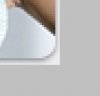
I bought a web template and am modifying the images to what I need them to be. I can not for the life of me figure out how they did this rounded corner and shadowing on the corner. I can easily, manually copy the two lines going up the sides of the image. (Jimmy rig) ... but I can't seem to get the corner to look right.
I know it looks like a drop shadow, but you'd need to know all the colors and exact settings to copy that drop shadow and all i have is the finished product.
I need to pop a different image in there other than the girl, and then give it that edge and rounded corner and shadlow. If you give me instructions please be extremely clear and detailed step by step. Dont assume I know anything because i know nothing LOL
Thank you!